# Exporting a resume to Markdown (https://docs.hireway.dev/docs/sharing/exporting-resume-to-markdown)
Markdown is plain text with a few symbols for headings, lists and links. A Markdown export gives you the words of your resume without its design, which is what you want when you paste into a form, feed an AI tool or keep your resume in a notes app.
For applying to jobs, download a PDF instead. See [Downloading your resume](/docs/sharing/exporting-your-resume).
## Download the Markdown file [#download-the-markdown-file]
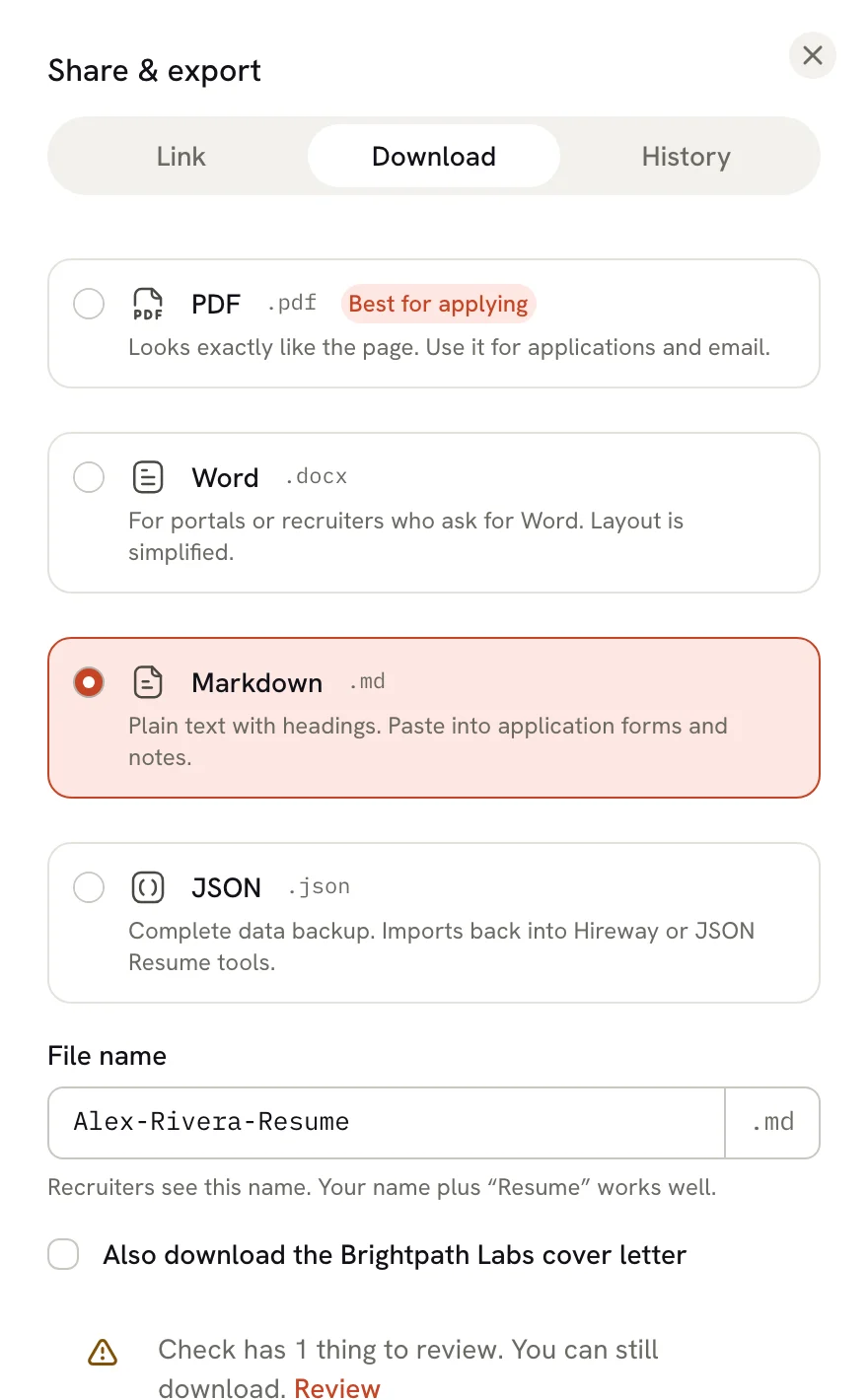
In the editor, select the arrow beside **Download PDF**, or press ⌘ ⇧ E (
Ctrl Shift E on Windows and Linux).
Select **Markdown**. The file name ends in `.md`; change the name in **File name** if you like.
Select **Download Markdown**. Your browser saves the file.
 ## What the file looks like [#what-the-file-looks-like]
This is the start of a Markdown export of the sample resume, shortened:
```md
# David Kowalski
_Game Developer | Unity & Unreal Engine Specialist_
david.kowalski@email.com · +1 (555) 291-4756 · Seattle, WA · [davidkowalski.games](https://davidkowalski.games) · [github.com/dkowalski-dev](https://github.com/dkowalski-dev) · [itch.io/dkowalski](https://itch.io/dkowalski)
## Summary
**Passionate game developer with 5+ years of professional experience** creating engaging gameplay systems and polished player experiences across multiple platforms.
## Education
### University of Washington — Bachelor of Science, Computer Science (2014 – 2018)
_Seattle, WA · Grade: 3.6 GPA_
## Experience
### Cascade Studios — Senior Game Developer (March 2022 – Present)
_Seattle, WA_
- Lead gameplay programmer on an unannounced AAA action-adventure title built in Unreal Engine 5
- Developed custom editor tools in C++ that reduced level designer iteration time by 40%
## Profiles
- **GitHub** — dkowalski-dev ([github.com/dkowalski-dev](https://github.com/dkowalski-dev))
- **LinkedIn** — davidkowalski ([linkedin.com/in/davidkowalski](https://linkedin.com/in/davidkowalski))
```
Your name becomes the top heading and each section a second-level heading. Entries such as jobs, schools and projects get a third-level heading with their dates; shorter entries such as skills, languages and profiles become one bullet each. Sections follow your pages in order, the main column first and then the sidebar.
## What's included [#whats-included]
The file keeps:
- your name, headline and contact details;
- every visible section and entry, with section titles in your resume's language;
- paragraphs, numbered and nested lists, links, **bold**, _italic_ and strikethrough text. Underline is kept as HTML `` markup where the Markdown viewer supports it.
It leaves out:
- hidden sections and entries;
- your photo;
- the template, fonts, colors, columns, icons and page breaks.
## Ways to use it [#ways-to-use-it]
| Use | Why Markdown helps |
| ----------------------- | ------------------------------------------------------------------------------------------------------------------------------------------------------ |
| **Application forms** | Many job portals have plain text boxes. Markdown pastes cleanly, without the stray characters a PDF copy often brings. |
| **AI tools** | Headings and lists give an AI tool clear structure, without the layout noise of a PDF. Paste the job description alongside it and ask for suggestions. |
| **Notes apps** | Apps such as Obsidian use Markdown, so your resume can sit next to your interview notes. |
| **Websites and GitHub** | Many site builders take Markdown, and GitHub displays `.md` files, for example in a profile README. |
| **Version control** | Plain text shows clearly what changed from one version to the next. |
Hireway has its own AI assistant that can edit your resume directly. See [Using the
assistant](/docs/ai/using-the-assistant).
If an AI tool rewrites your Markdown, review the changes, then copy the parts you want back into the editor. Hireway doesn't import Markdown files.
## Related guides [#related-guides]
- [Downloading your resume](/docs/sharing/exporting-your-resume): PDF, Word and JSON, and when to use each.
- [Sharing your resume with a link](/docs/sharing/sharing-your-resume-publicly): send a link instead of a file.
## What the file looks like [#what-the-file-looks-like]
This is the start of a Markdown export of the sample resume, shortened:
```md
# David Kowalski
_Game Developer | Unity & Unreal Engine Specialist_
david.kowalski@email.com · +1 (555) 291-4756 · Seattle, WA · [davidkowalski.games](https://davidkowalski.games) · [github.com/dkowalski-dev](https://github.com/dkowalski-dev) · [itch.io/dkowalski](https://itch.io/dkowalski)
## Summary
**Passionate game developer with 5+ years of professional experience** creating engaging gameplay systems and polished player experiences across multiple platforms.
## Education
### University of Washington — Bachelor of Science, Computer Science (2014 – 2018)
_Seattle, WA · Grade: 3.6 GPA_
## Experience
### Cascade Studios — Senior Game Developer (March 2022 – Present)
_Seattle, WA_
- Lead gameplay programmer on an unannounced AAA action-adventure title built in Unreal Engine 5
- Developed custom editor tools in C++ that reduced level designer iteration time by 40%
## Profiles
- **GitHub** — dkowalski-dev ([github.com/dkowalski-dev](https://github.com/dkowalski-dev))
- **LinkedIn** — davidkowalski ([linkedin.com/in/davidkowalski](https://linkedin.com/in/davidkowalski))
```
Your name becomes the top heading and each section a second-level heading. Entries such as jobs, schools and projects get a third-level heading with their dates; shorter entries such as skills, languages and profiles become one bullet each. Sections follow your pages in order, the main column first and then the sidebar.
## What's included [#whats-included]
The file keeps:
- your name, headline and contact details;
- every visible section and entry, with section titles in your resume's language;
- paragraphs, numbered and nested lists, links, **bold**, _italic_ and strikethrough text. Underline is kept as HTML `` markup where the Markdown viewer supports it.
It leaves out:
- hidden sections and entries;
- your photo;
- the template, fonts, colors, columns, icons and page breaks.
## Ways to use it [#ways-to-use-it]
| Use | Why Markdown helps |
| ----------------------- | ------------------------------------------------------------------------------------------------------------------------------------------------------ |
| **Application forms** | Many job portals have plain text boxes. Markdown pastes cleanly, without the stray characters a PDF copy often brings. |
| **AI tools** | Headings and lists give an AI tool clear structure, without the layout noise of a PDF. Paste the job description alongside it and ask for suggestions. |
| **Notes apps** | Apps such as Obsidian use Markdown, so your resume can sit next to your interview notes. |
| **Websites and GitHub** | Many site builders take Markdown, and GitHub displays `.md` files, for example in a profile README. |
| **Version control** | Plain text shows clearly what changed from one version to the next. |
Hireway has its own AI assistant that can edit your resume directly. See [Using the
assistant](/docs/ai/using-the-assistant).
If an AI tool rewrites your Markdown, review the changes, then copy the parts you want back into the editor. Hireway doesn't import Markdown files.
## Related guides [#related-guides]
- [Downloading your resume](/docs/sharing/exporting-your-resume): PDF, Word and JSON, and when to use each.
- [Sharing your resume with a link](/docs/sharing/sharing-your-resume-publicly): send a link instead of a file.