

Exporting your data
Download everything in your Hireway account, including resumes, cover letters and job applications, as JSON files in a single zip archive.
You can download a copy of everything you have stored in Hireway in one step. Use it as a backup, to keep a record before deleting your account, or to take your data elsewhere.
Download the archive
Open Your data
Select your name at the bottom of the sidebar, then Settings. On the Account page, scroll to Your data.
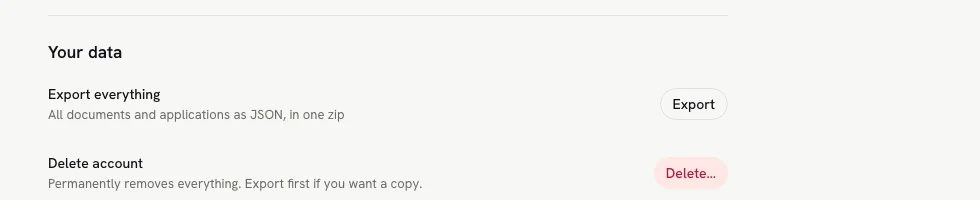
Select Export
Next to Export everything, select Export. Your browser downloads a file named hireway- followed by today's date, for example hireway-2026-09-30.zip.
What's in the zip
| File | Contents |
|---|---|
account.json | Your name, email, username, photo address, whether your email is verified, and when the account was created and last updated. |
applications.json | Every job application with its status, job details, notes, contacts, follow-ups and activity. |
resumes/ | One JSON file per resume, including those in the trash. Each holds the resume's name, public address, tags, sharing settings and the full resume content. |
letters/ | One JSON file per cover letter. |
Each resume and letter file is named after the document plus a unique ID, so two documents with the same name don't overwrite each other.
The archive doesn't include your password, passkeys, two-step verification codes, API keys or AI provider keys. Uploaded images, such as resume photos, are listed by their address rather than included as files.
To restore a resume or letter, extract the archive and import its individual JSON file from resumes/ or letters/.
Resume content and design are restored as a new document; account settings, document sharing settings and application
links are not restored. The whole zip is an account backup, not a bulk-import file. You can also download one resume
as JSON from the Share sheet. See Importing resumes.
Related guides
- Exporting your resume: PDF, Word, Markdown and JSON for a single resume.
- Importing resumes: bring a resume file into Hireway.
- Deleting your account: remove your account and everything in it.
Setting up passkeys
Add a passkey to your Hireway account to sign in with your fingerprint, face, device PIN or security key instead of a password.
Deleting your account
Permanently delete your Hireway account, including every resume, cover letter, job application, API key and public link. Export a copy first.