

Deleting your account
Permanently delete your Hireway account, including every resume, cover letter, job application, API key and public link. Export a copy first.
Deleting your account removes it and everything in it for good. There is no grace period and no way to restore it, so download a copy of your data first if you might want it later.
Before you start
Export your data from Settings → Account → Your data. The zip holds your resumes, cover letters and job applications as JSON files.
Delete your account
Open Your data
Select your name at the bottom of the sidebar, then Settings. On the Account page, scroll to Your data.
Select Delete…
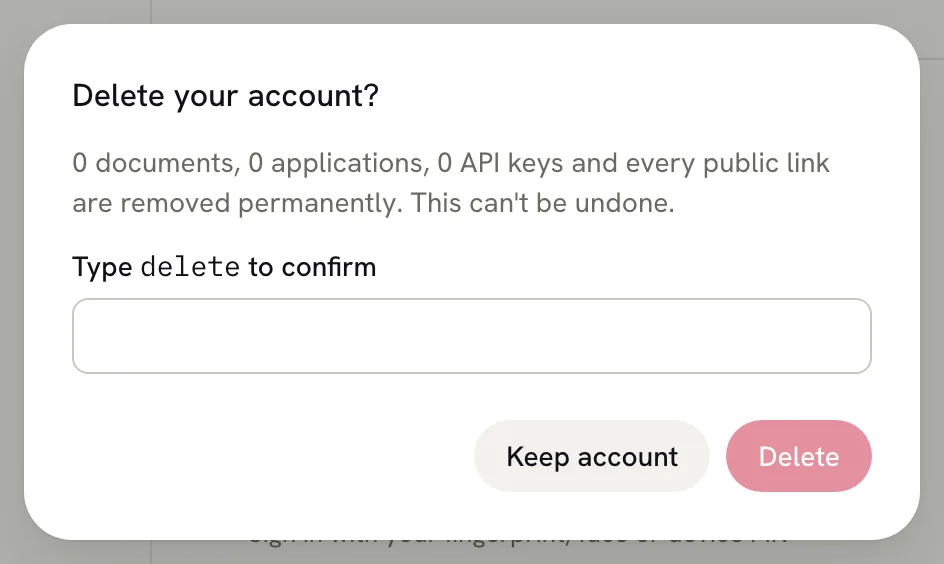
Next to Delete account, select Delete…. The Delete your account? dialog lists how many documents, applications and API keys will go.
Type delete to confirm
Type delete into the box. The Delete button stays unavailable until the word matches. To back out, select Keep
account.
Select Delete
Hireway deletes your account, signs you out and takes you to the home page.
What gets deleted
- Every resume and cover letter, including those in the trash, and their version history.
- Every job application.
- Every public resume link. Anyone who opens one sees a page that no longer exists.
- Your uploaded files, such as photos.
- Your assistant conversations, API keys, saved AI providers, passkeys and linked social accounts.
This can't be undone from the app. To use Hireway again, create a new account and import resumes you saved as JSON or PDF.
Related guides
- Exporting your data: download everything before you delete.
- Exporting your resume: keep a PDF or JSON of a single resume.
Exporting your data
Download everything in your Hireway account, including resumes, cover letters and job applications, as JSON files in a single zip archive.
Creating your first resume
Start a blank resume in Hireway, add your name and contact details, fill in your first section, and download it as a PDF.