

Adding an application
Save a job from its link or posting, then prepare a resume or record what you already submitted.
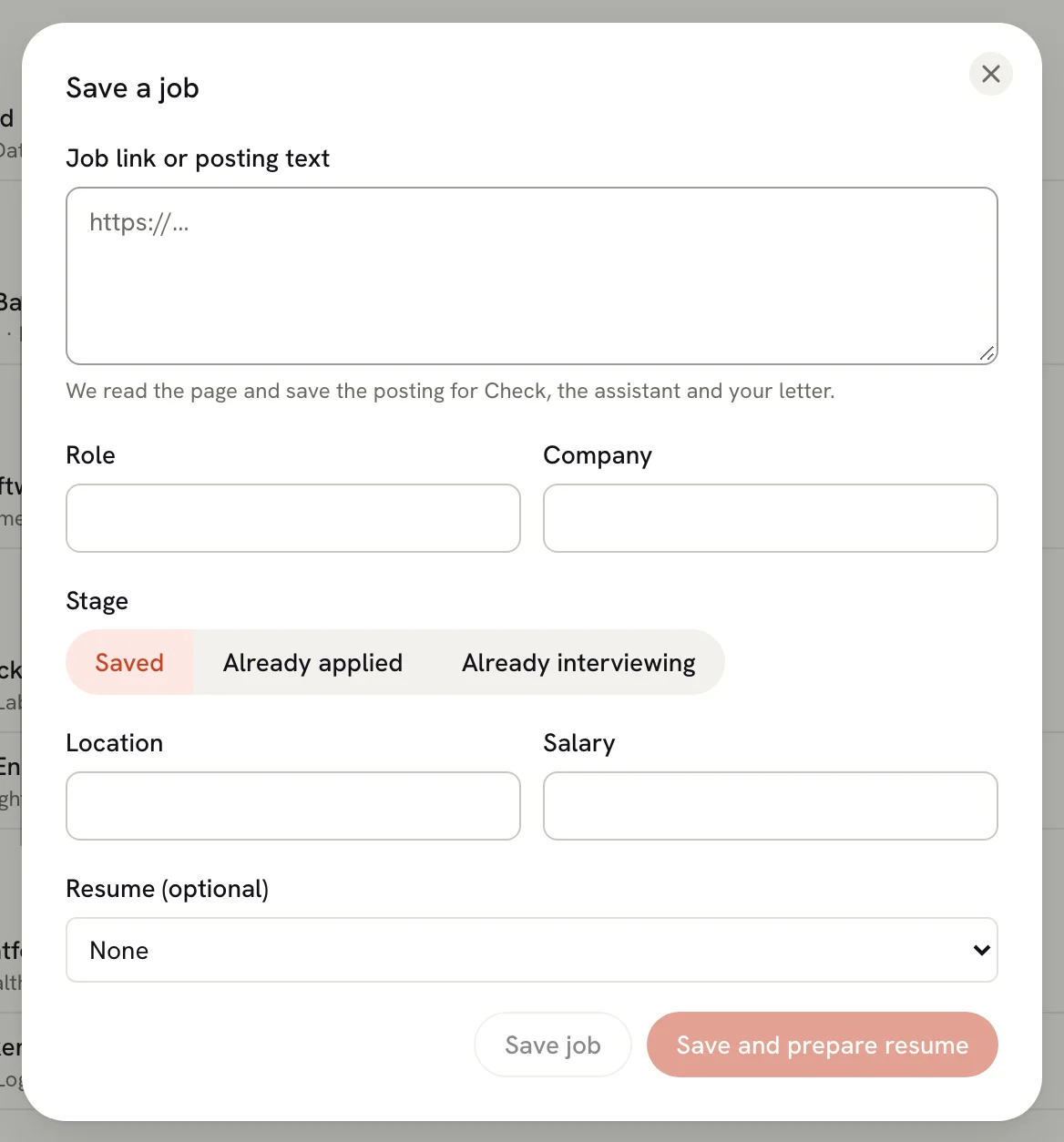
Save a job as soon as you find one you like, or record an application you've already submitted. Paste the job link or posting text, check the role and company, and save it. A saved posting gives Check, the assistant and your cover letter context for this job.
Saving a job and preparing a resume manually work without an AI connection or an external web account.
Save a job
Open the Save a job dialog
In Applications, select Save job. You can also press ⌘ K (Ctrl K on Windows and Linux) and run New Application.
Paste the job link or posting
Paste into Job link or posting text. A single web address counts as a link; anything else counts as posting text. Select Read posting to retrieve a link's text and any available job details. Reading starts only when you select the button; you can also save the link without reading it.
Check the role and company
Reading may fill Role, Company, Location and Salary. Correct anything that was found, and fill missing fields yourself. Only Role and Company are required.
Pick a stage
Saved is the default. Choose Already applied or Already interviewing only if that happened, then confirm the application date and select any documents you actually submitted.
Add it
Select Save job to open its details, or Record application when recording a submission. Save and prepare resume also opens the flow for copying a resume for this job; your original stays unchanged. See Tailoring a resume for a job.
What gets read from a posting
What Read posting can fill depends on what you paste and whether you already have a usable AI connection:
| You paste | Without an AI provider | With an AI provider |
|---|---|---|
| A job link | Saves the page text; may fill role, company and location from structured job details. | May also fill salary and a short list of what the job asks for. |
| Posting text | Saves the text. Fill in the role and company yourself. | May fill role, company, location, salary and requirements. |
Pasted text is saved up to 20,000 characters. A link keeps its original address; its description stays empty until you read it or paste text. Review Saved description after reading. If the description is clipped or incomplete, use Paste description instead to replace it before preparing your resume; the original link is retained. Source details such as retrieval time appear when available, and do not guarantee the posting is current.
AI enrichment is optional. If it fails, the retrieved description is retained so you can complete the fields manually.
Only public HTTP(S) pages can be read. If a page requires sign-in or can't be retrieved, paste its description in Paste description instead, fill in the role and company, and save. The original link stays with the job.
Add more details
The Save a job dialog keeps things short on purpose. Once the application is saved, its details sheet opens, where you can add the salary, source, contacts, tags, notes and a follow-up date. To edit everything in one form, including the job posting link, location and linked resume, open the ⋯ menu in the details sheet and select Edit details…. See Managing an application.
Other ways to add applications
- From a spreadsheet: import many at once from a CSV file. See Importing applications from CSV.
- From an AI client: create applications over MCP. See Managing applications with MCP.
Next steps
- Managing an application: move it through stages and keep notes.
- Tailoring a resume for a job: make a version of your resume for this posting.
Tracking job applications
Keep every job you apply for in one place: see what needs you next, move applications through stages, and switch between List, Board, Insights and Calendar.
Managing an application
Use an application's details sheet to change its stage, plan the next step, see what you sent, keep notes and contacts, and close or delete it.