

Exporting a resume to Markdown
Download your resume as a Markdown file: plain text with headings for application forms, AI tools, notes, websites and version control.
Markdown is plain text with a few symbols for headings, lists and links. A Markdown export gives you the words of your resume without its design, which is what you want when you paste into a form, feed an AI tool or keep your resume in a notes app.
For applying to jobs, download a PDF instead. See Downloading your resume.
Download the Markdown file
Open the Download tab
In the editor, select the arrow beside Download PDF, or press ⌘ ⇧ E ( Ctrl Shift E on Windows and Linux).
Choose Markdown
Select Markdown. The file name ends in .md; change the name in File name if you like.
Download
Select Download Markdown. Your browser saves the file.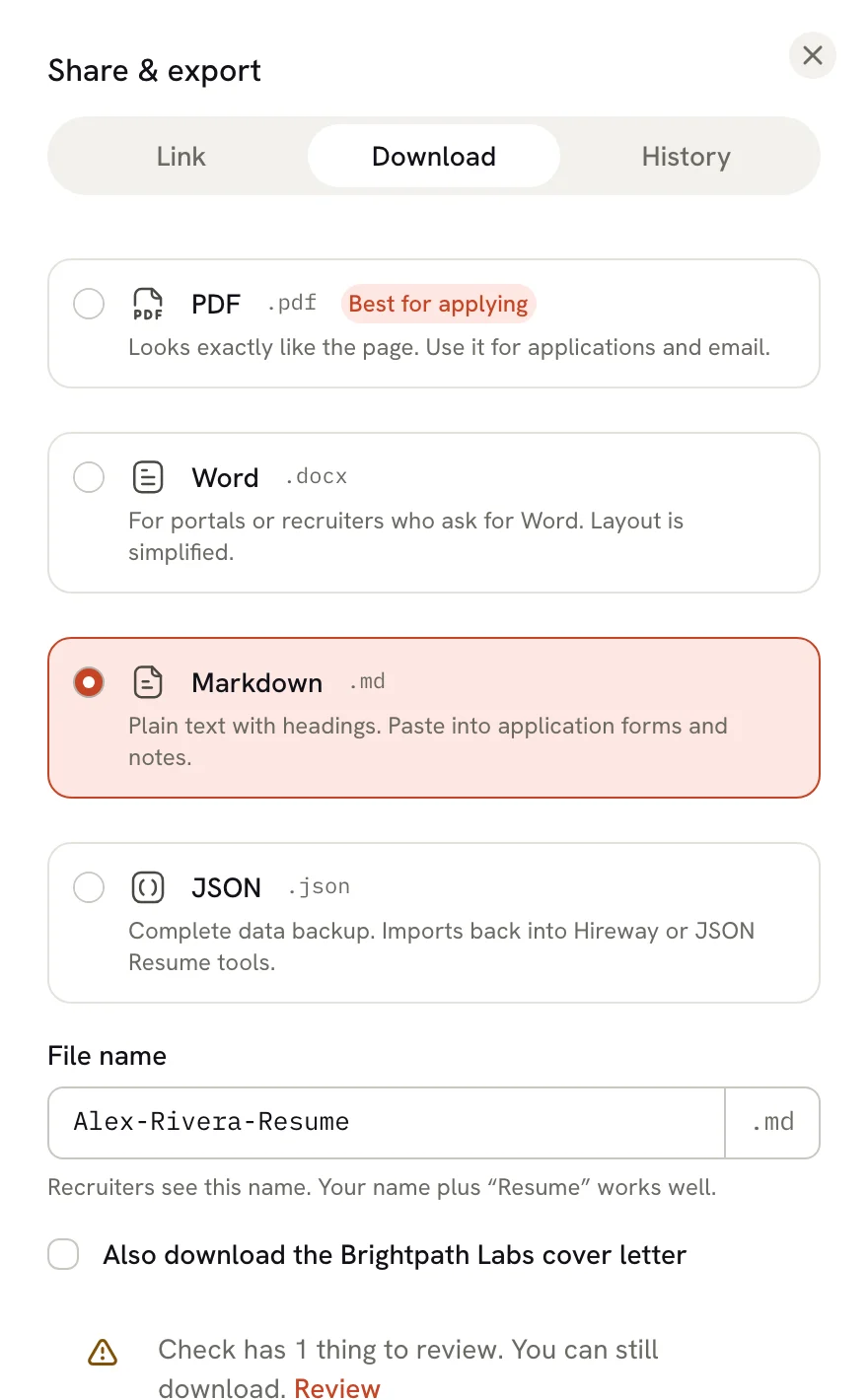
What the file looks like
This is the start of a Markdown export of the sample resume, shortened:
# David Kowalski

_Game Developer | Unity & Unreal Engine Specialist_

david.kowalski@email.com · +1 (555) 291-4756 · Seattle, WA · [davidkowalski.games](https://davidkowalski.games) · [github.com/dkowalski-dev](https://github.com/dkowalski-dev) · [itch.io/dkowalski](https://itch.io/dkowalski)

## Summary

**Passionate game developer with 5+ years of professional experience** creating engaging gameplay systems and polished player experiences across multiple platforms.

## Education

### University of Washington — Bachelor of Science, Computer Science (2014 – 2018)

_Seattle, WA · Grade: 3.6 GPA_

## Experience

### Cascade Studios — Senior Game Developer (March 2022 – Present)

_Seattle, WA_

- Lead gameplay programmer on an unannounced AAA action-adventure title built in Unreal Engine 5
- Developed custom editor tools in C++ that reduced level designer iteration time by 40%

## Profiles

- **GitHub** — dkowalski-dev ([github.com/dkowalski-dev](https://github.com/dkowalski-dev))
- **LinkedIn** — davidkowalski ([linkedin.com/in/davidkowalski](https://linkedin.com/in/davidkowalski))
Your name becomes the top heading and each section a second-level heading. Entries such as jobs, schools and projects get a third-level heading with their dates; shorter entries such as skills, languages and profiles become one bullet each. Sections follow your pages in order, the main column first and then the sidebar.
What's included
The file keeps:
- your name, headline and contact details;
- every visible section and entry, with section titles in your resume's language;
- paragraphs, numbered and nested lists, links, bold, italic and strikethrough text. Underline is kept as HTML
<u>markup where the Markdown viewer supports it.
It leaves out:
- hidden sections and entries;
- your photo;
- the template, fonts, colors, columns, icons and page breaks.
Ways to use it
| Use | Why Markdown helps |
|---|---|
| Application forms | Many job portals have plain text boxes. Markdown pastes cleanly, without the stray characters a PDF copy often brings. |
| AI tools | Headings and lists give an AI tool clear structure, without the layout noise of a PDF. Paste the job description alongside it and ask for suggestions. |
| Notes apps | Apps such as Obsidian use Markdown, so your resume can sit next to your interview notes. |
| Websites and GitHub | Many site builders take Markdown, and GitHub displays .md files, for example in a profile README. |
| Version control | Plain text shows clearly what changed from one version to the next. |
Hireway has its own AI assistant that can edit your resume directly. See Using the assistant.
If an AI tool rewrites your Markdown, review the changes, then copy the parts you want back into the editor. Hireway doesn't import Markdown files.
Related guides
- Downloading your resume: PDF, Word and JSON, and when to use each.
- Sharing your resume with a link: send a link instead of a file.
Downloading your resume
Download your resume as a PDF in one click, or as Word, Markdown or JSON from the Share sheet. Learn which format to use and how to print.
Connecting an AI provider
Add your own AI provider key in Hireway, test the connection, and choose which provider the assistant and other AI features use.