

Using the MCP server
Connect Claude, Cursor, Codex or any MCP client to Hireway with OAuth or an API key, and see every tool, prompt and resource it offers.
Hireway runs a Model Context Protocol (MCP) server, so AI clients such as Claude, Cursor and Codex can read and edit your resumes, cover letters and job applications when you ask them to in plain language. This guide shows you how to connect a client and lists everything the server offers.
Before you start
- You need a Hireway account.
- Your MCP client must support remote servers over Streamable HTTP, or be able to run the
mcp-remotebridge. - Decide how the client signs in:
- OAuth (recommended). You approve the client in your browser. No secret is copied anywhere.
- API key. For clients that can't do OAuth but can send a custom header. Create a key first, as described in Using the API.
Find your server address
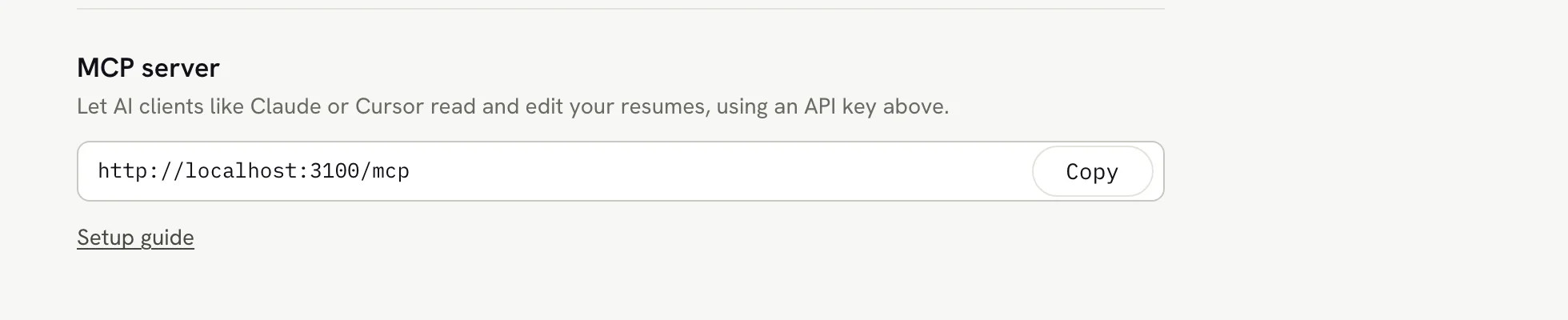
The server address is https://hireway.dev/mcp. You can copy it from Settings → AI & developer, in the MCP server section.
Connect with OAuth
Add the server to your client
Add a remote MCP server with the address https://hireway.dev/mcp and no headers. Client-specific steps are in Set up popular clients.
Sign in to Hireway
Your client opens a browser window. If you aren't signed in, Hireway asks you to sign in first.
Approve the connection
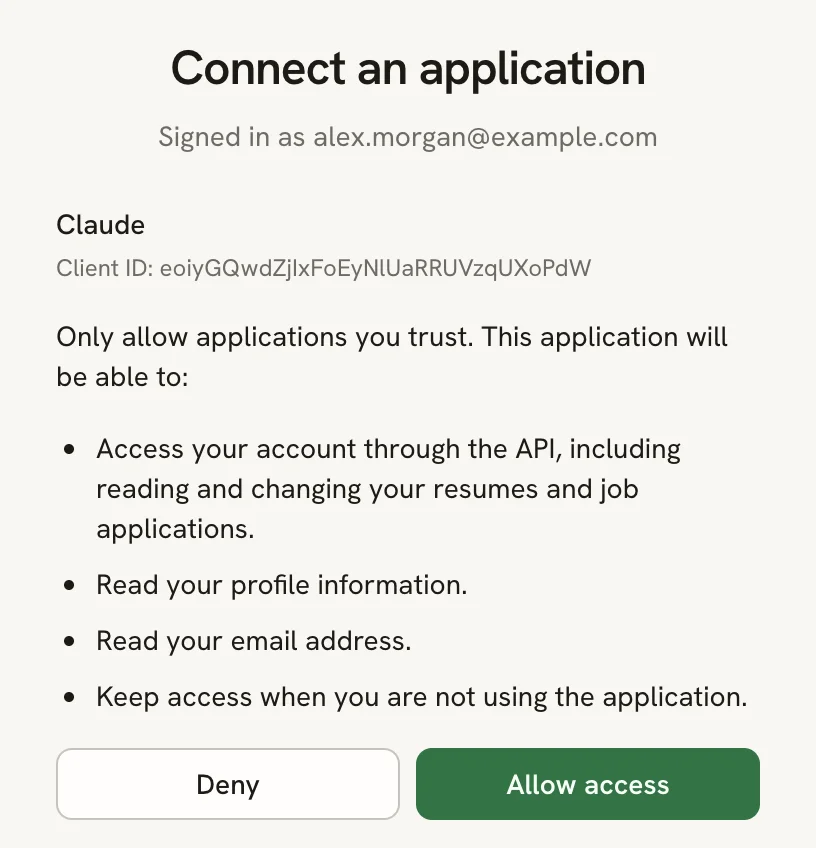
Check the application name under Connect an application, read what it will be able to do, and select Allow access. Select Deny if you don't recognize the application.
Return to your client
The browser hands control back to your client, which can now use the Hireway tools.
Connect with an API key
If your client can't do OAuth, send your API key in the x-api-key header:
{
  "mcpServers": {
    "hireway": {
      "url": "https://hireway.dev/mcp",
      "headers": { "x-api-key": "YOUR_API_KEY" }
    }
  }
}
If your client only runs local commands, use mcp-remote as a bridge. It needs a current version of Node.js:
{
  "mcpServers": {
    "hireway": {
      "command": "npx",
      "args": ["mcp-remote", "https://hireway.dev/mcp", "--header", "x-api-key:YOUR_API_KEY"]
    }
  }
}
An API key in a config file grants its configured permissions. Choose read-only access when edits are unnecessary. Keep the file private, and revoke the key in Settings if it leaks.
Set up popular clients
Add a custom connector with the URL https://hireway.dev/mcp, then connect it and approve access in the browser. See Anthropic's guide to custom connectors.
claude mcp add --transport http hireway https://hireway.dev/mcpThen run /mcp inside Claude Code and choose hireway to sign in.
Add the server to .cursor/mcp.json in your project, or ~/.cursor/mcp.json for all projects:
{
  "mcpServers": {
    "hireway": { "url": "https://hireway.dev/mcp" }
  }
}
Cursor offers to sign in when it first connects. To use an API key instead, add the headers object shown in Connect with an API key.
codex mcp add hireway --url https://hireway.dev/mcp
codex mcp login hireway
To use an API key instead, add this to ~/.codex/config.toml:
[mcp_servers.hireway]
url = "https://hireway.dev/mcp"
http_headers = { "x-api-key" = "YOUR_API_KEY" }Use the server address with your client's remote MCP (Streamable HTTP) option. If it asks for a transport, choose HTTP. If it can't do OAuth, send the x-api-key header.
Try it
Ask your client something like:
- "List my resumes."
- "Change the headline on my Game Developer Resume to Senior Game Developer."
- "Add Unreal Engine 5 to my skills with the level Expert."
- "Make a copy of my Game Developer Resume for a technical designer role."
- "Review my resume and give me a score." (uses the
review_resumeprompt)
Before it edits, the client reads the resume with read_resume, then changes it with apply_resume_patch. Every change it makes appears in the resume's history as AI edit, so you can restore an earlier version. See Undoing changes and version history.
For job applications, see Managing applications with MCP.
Tools
The server keeps the original 43 tool names and adds API-derived tools for the remaining workflows. Each advertises input/output schemas, structured results and MCP annotations. Clients should use these hints to decide when to request confirmation; the server independently enforces authentication, permissions and ownership. Use tools/list or the server card for the current catalog.
Resumes
| Tool | What it does |
|---|---|
list_resumes | Lists your resumes (ID, name, slug, tags, public and locked status, dates). Filter by tags, sort by lastUpdatedAt, createdAt or name. |
list_resume_tags | Lists every tag used across your resumes. |
read_resume | Returns full data, with ID, name and updatedAt in structuredContent. |
download_resume_pdf | Returns a signed PDF download link that expires in 10 minutes. |
create_resume | Creates a resume with a name and slug, empty or with sample content (withSampleData). |
import_resume | Creates a resume from a full resume data object, such as a JSON export. |
duplicate_resume | Copies a resume under a new name and slug. |
apply_resume_patch | Changes content with JSON Patch; supply expectedUpdatedAt from read_resume to reject stale edits. See Using the patch API. |
update_resume | Changes the name, slug, tags or public setting, and returns the public address. Use api_resume_set_password for passwords. |
delete_resume | Moves a resume to Trash, where it stays for 30 days. |
lock_resume | Locks a resume so it can't be edited or deleted. |
unlock_resume | Unlocks a resume. |
get_resume_statistics | Returns view and download counts, and when the resume was last viewed and downloaded. |
Cover letters
| Tool | What it does |
|---|---|
list_cover_letters | Lists your cover letters. Filter by name (search), resumeId or applicationId. |
read_cover_letter | Returns one letter, including its revision. |
create_cover_letter | Creates a letter, optionally linked to a resume (for its sender details and design) or an application. |
update_cover_letter | Changes a letter's text, recipient, template or links. Needs the latest revision as expectedRevision. |
refresh_cover_letter_style | Copies the sender details and design from a resume, keeping the letter's text and template. Needs expectedRevision. |
duplicate_cover_letter | Copies a letter. |
delete_cover_letter | Moves a letter to Trash for 30 days. Needs expectedRevision. |
export_cover_letter | Returns a letter as versioned cover-letter JSON. |
import_cover_letter | Creates a letter from cover-letter JSON produced by export_cover_letter. |
Applications
| Tool | What it does |
|---|---|
list_applications | Lists your applications with contacts, documents and timeline. Filter by stage (status) or tags. |
read_application | Returns one application in full. |
list_application_tags | Lists every tag used across applications. |
get_application_stats | Counts applications by stage and source. |
create_application | Creates an application. company and role are required. |
update_application | Changes fields, moves the stage, edits contacts, follow-up and tags, or links a resume and letter. Lists you send replace the old ones. |
add_application_note | Adds a note to the activity timeline. |
add_application_interview | Schedules an interview (screening, technical, behavioral, onsite or other). |
update_application_interview | Reschedules or edits an interview. |
update_application_timeline_entry | Changes the date of a stage or note entry, or a note's text. |
delete_application_timeline_entry | Deletes a note, an interview or an older stage entry. |
delete_application | Permanently deletes an application and the PDFs uploaded to it. |
bulk_update_applications | Moves several applications to a stage or adds tags to them. |
bulk_delete_applications | Permanently deletes several applications. |
import_applications | Creates up to 500 applications from parsed rows. |
attach_application_document | Attaches a PDF using bounded inline base64 or an owned storage reference (up to 10 MiB). |
remove_application_document | Removes an attached PDF. |
autofill_application_from_job | Reads a pasted job posting with your AI provider and suggests company, role, location and salary. |
score_application_match | Scores the linked resume against the job description with your AI provider. |
tailor_resume_for_application | Makes a private copy of the linked resume with a summary rewritten for the job by your AI provider, and links the copy to the application. |
draft_application_message | Drafts a cover letter (saved as a new letter) or a recruiter follow-up with your AI provider. |
The last four tools send data to the AI provider you set up in Hireway and need a tested default provider. See Connecting an AI provider.
Additional API workflows
Additional tools use api_ followed by the API router path in snake case. Inputs come from the same validated contracts as the API. Existing tool names remain available.
| Area | Examples | Coverage |
|---|---|---|
| Resume history and sharing | api_resume_list_versions, api_resume_restore_version, api_resume_set_password | List/read/create/rename/delete/restore versions; passwords, slug availability, public reads and daily statistics |
| Letter history and drafts | api_cover_letters_get_version, api_cover_letters_draft | All version actions; draft, shorter and personal variants; existing update tool accepts complete style fields |
| Document library | api_documents_list, api_documents_copy_for_job, api_documents_purge_expired | Counts, names, tags, locks, application links, Trash, restore, permanent deletion and expired Trash cleanup |
| Files and exports | api_rest_document_exports_resume, api_rest_document_exports_letter, api_rest_file_upload | PDF, DOCX, Markdown and JSON exports; file upload/delete and supported file imports |
| Checks and AI | api_rest_check_resume, api_rest_check_pdf, api_rest_match_resume, api_ai_improve | Deterministic checks and matching; PDF/DOCX parsing, qualitative review, line rewrites, job search and posting extraction |
| Assistant | api_agent_threads_start, api_agent_messages_send, api_agent_attachments_create | Threads, messages, cancellation, resumable replies, proposed edit status and attachments |
| Account and instance | api_auth_export_data, api_auth_delete_account, api_flags_get | Account export, browser handoff for account deletion, enabled auth providers and platform statistics |
| Integrations | api_ai_providers_list, api_web_access_status | Provider list/test/delete and web connection status/test/delete; credential entry uses browser handoffs |
Resume and letter exports return authenticated REST URLs. Download with your existing credentials or open in your signed-in browser. Letter localization words are encoded in the URL. No generated file is permanently copied into storage by the export tool.
Lists default to 20 results and accept limit (up to 100) and offset; continue paging until no more results. Array results use { items: [...] } in structuredContent. Scalar results use { result: ... }. Dates use ISO 8601. Resume edits can use optimistic concurrency with expectedUpdatedAt; letter edits require expectedRevision. After a conflict, reread before retrying.
Document listing never deletes expired Trash. Run api_documents_purge_expired explicitly to permanently remove documents trashed more than 30 days ago. Individual permanent deletion requires moving the document to Trash first.
File limits and references
The Streamable HTTP JSON request limit is 4 MiB. Inline base64 is limited to 3 MiB of encoded text (approximately 2.25 MiB of file bytes), leaving space for JSON metadata. Larger files use an owned storagePath returned by the REST file upload or assistant attachment endpoint:
{
  "file": {
    "name": "resume.pdf",
    "contentType": "application/pdf",
    "storagePath": "uploads/YOUR_USER_ID/pictures/FILE_ID.pdf"
  }
}
The server reads storage directly and verifies the account prefix and path segments. External URLs and other users' files cannot be used as references. The API still validates each operation's file type and size: ordinary uploads/imports and application PDFs allow 10 MiB, PDF checking allows 25,000,000 bytes, and assistant attachments allow 25 MiB. Upload larger assistant attachments through their REST endpoint before referencing them. Small application attachments use fileName, contentType, and either dataBase64 or storagePath.
Browser and streaming workflows
open_account_settings opens profile, security, API keys, preferences or account settings. Provider creation/update and web credential entry return their authenticated settings page. Account deletion, password changes, passkeys, two-factor authentication and provider credentials require user interaction in that browser. Browser preferences, local undo and document selection remain browser workflows; durable edits and history are available through MCP.
MCP is stateless and accepts POST requests with JSON responses. GET/DELETE return 405; there is no standalone SSE subscription. Draft/message streams are collected up to 500,000 characters; truncated identifies longer responses. Read the assistant thread for persisted replies. api_resume_updates_subscribe returns an owned snapshot; poll its updatedAt for changes. api_resume_verify_password returns a resource cookie capability; pass it as resourceCookie to api_resume_get_by_slug. It expires server-side after ten minutes and cannot authenticate an account.
The installed SDK uses its supported MCP 1.x protocol negotiation, including 2025-11-25. Protocol revisions beyond that require a separate SDK/compatibility upgrade; this server does not claim support for untested future versions.
Browser requests must use the configured application Origin; native clients normally omit Origin. Responses are private and uncached. Request/user rate limits supplement each API operation's own limits; signed PDF downloads share the renderer limit with REST exports.
Prompts
Prompts are ready-made instructions your client can start from. Each takes a resume id and includes that resume and the schema.
| Prompt | What it does |
|---|---|
build_resume | Walks you through building a resume section by section. |
improve_resume | Suggests concrete improvements to wording, impact and structure. |
review_resume | Gives a structured critique with a scorecard and prioritized recommendations, without changing anything. |
Resources
| URI | Contents |
|---|---|
resume://_meta/schema | The resume data JSON Schema, listed in resources/list. Clients use it to build valid patches. |
resume://{id} | One resume's full data as JSON. This is a resource template (resources/templates/list); find IDs with list_resumes. |
Hireway also publishes a server card at /.well-known/mcp/server-card.json that summarizes the tools, prompts and resources, for clients that discover servers without connecting.
How authentication works
This section is for client developers.
- The server checks
x-api-key: <key>first, thenAuthorization: Bearer <token>. MCP never accepts account session cookies. Invalid explicit credentials cannot borrow a browser session. - A request with neither gets
401and aWWW-Authenticate: Bearer resource_metadata="https://hireway.dev/.well-known/oauth-protected-resource"header. OAuth clients use it to discover the authorization server. - Authorization server metadata is at
/.well-known/oauth-authorization-server. The authorization server supports dynamic client registration and PKCE withS256. - New OAuth clients can request
api:read,api:writeandapi:delete. The consent screen describes these permissions alongside identity scopes. Existing identity-only grants and legacy keys without permission statements retain account-wide access for compatibility. - The server checks the user, client, login session and consent grant on every authenticated request. Disabled clients, banned accounts, ended sessions and revoked grants cannot continue using signed tokens. Proof-bound DPoP tokens are rejected: this endpoint supports ordinary bearer access tokens.
- Revoke a connection under Settings → AI & developer → Connected applications. Revoking the application grant invalidates existing access and refresh tokens. The authorization provider does not support revoking one self-contained JWT independently of its grant.
Troubleshooting
| Problem | What to do |
|---|---|
| "Unauthorized" and no sign-in window | Your client doesn't support MCP OAuth. Connect with an API key. |
| The sign-in window says the request is invalid or has expired | Start the connection again from your client. |
401 with an API key | The key is wrong, revoked or expired. Create a new one in Settings → AI & developer. |
| A tool says the resume is locked | Unlock it in the app, or ask the client to run unlock_resume. |
| A tool says an ID wasn't found | Ask the client to list resumes, letters or applications first to get valid IDs. |
| An edit to dates doesn't stick | The client changed the period or date text. Ask it to write the dates object instead. |
| A tool rejects a large file | Upload through the REST file/attachment endpoint and pass an owned storage reference. |
Related guides
- Managing applications with MCP: prompts for tracking your job search from an AI client.
- Using the patch API: how resume edits are expressed.
- Using the API: API keys and the REST API.
JSON resume schema
The Hireway JSON Schema published at /schema.json: what it covers, how resume data is structured, and how to validate files against it.
Managing applications with MCP
Track job applications from an AI client connected to Hireway: add roles, move stages, schedule interviews, attach sent PDFs and draft letters.