

Using the API
Create a Hireway API key, send authenticated REST requests to read and edit your resumes, and revoke keys you no longer need.
The Hireway REST API lets your own scripts, extensions and automations read and change your documents and job applications. You authenticate with an API key that you create in Settings. This guide walks you through creating a key, making your first request and revoking the key when you're done.
Before you start
- You need a Hireway account. The examples use
https://hireway.dev. - An API key acts as you. Anyone who has it can read and edit your documents, so treat it like a password.
Create an API key
Open AI & developer settings
Select your name at the bottom of the sidebar, choose Settings, then open AI & developer. You can also press ⌘ K (Ctrl K on Windows and Linux) and type "API keys".
Start a new key
In the API keys section, select New key.
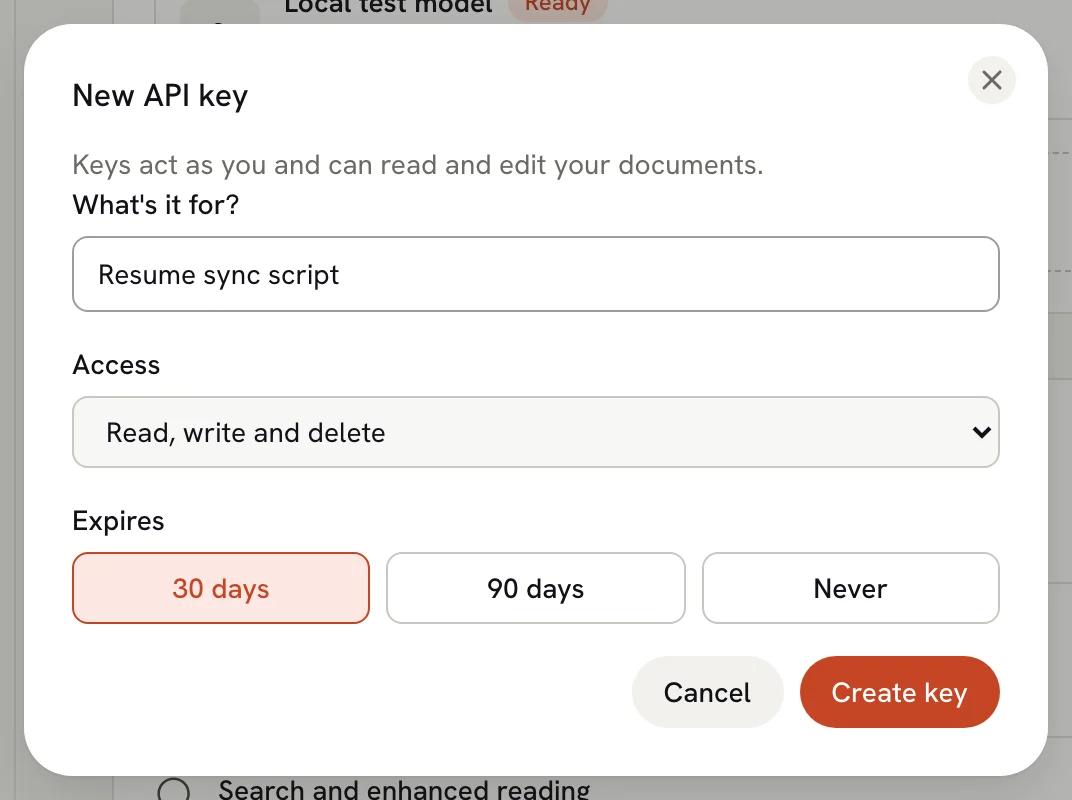
Name the key and choose when it expires
Under What's it for?, enter a name that reminds you where the key is used, such as "Resume sync script". Under Expires, choose 30 days, 90 days or Never, then select Create key.
Copy the key
Select Copy, store the key somewhere safe (a password manager or your deployment's secret store), then select Done.
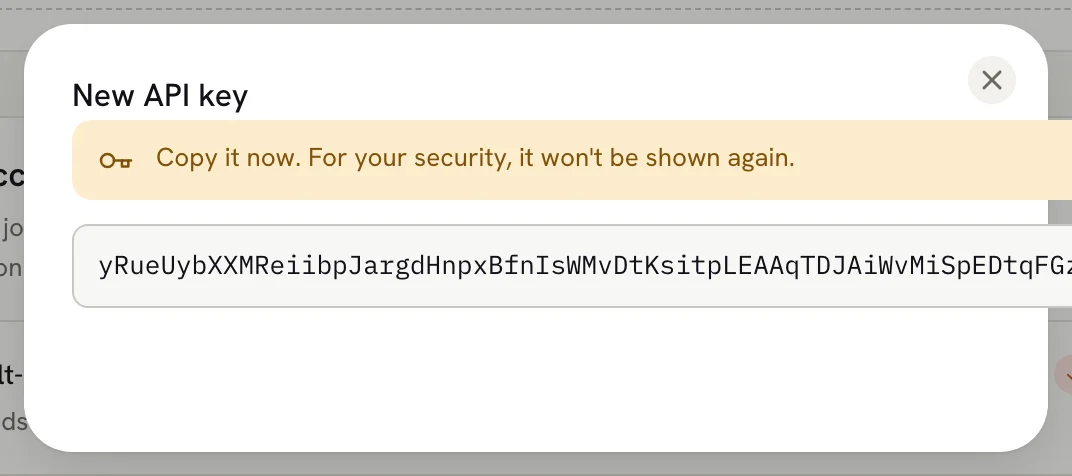
Hireway shows the key only once. If you lose it, revoke it and create a new one.
Your keys are listed in the API keys table with the date each was created, the date it was last used and when it expires. Expired keys disappear from the list and stop working.

Make your first request
The REST API lives under /api/openapi on https://hireway.dev. Send your key in the x-api-key header.
curl "https://hireway.dev/api/openapi/resumes" \
  -H "x-api-key: YOUR_API_KEY"
The response is a JSON array of your resumes, without their full content:
[
  {
    "id": "01a0efa5-6529-745e-950a-521ef5b8afc7",
    "name": "Game Developer Resume",
    "slug": "game-developer-resume",
    "tags": ["games"],
    "isPublic": false,
    "showDownloadButtons": true,
    "isLocked": false,
    "createdAt": "2026-09-30T00:09:49.101Z",
    "updatedAt": "2026-09-30T00:09:49.101Z"
  }
]
Fetch one resume with its full data, using an ID from the list:
curl "https://hireway.dev/api/openapi/resumes/01a0efa5-6529-745e-950a-521ef5b8afc7" \
  -H "x-api-key: YOUR_API_KEY"
For request bodies, send JSON with Content-Type: application/json. For example, create a resume filled with sample content:
curl -X POST "https://hireway.dev/api/openapi/resumes" \
  -H "x-api-key: YOUR_API_KEY" \
  -H "Content-Type: application/json" \
  -d '{ "name": "Product Designer Resume", "tags": ["design"], "withSampleData": true }'
The response is the new resume's ID as a JSON string.
To change a few fields in a resume without sending the whole document, use JSON Patch.
Find the endpoint you need
Every endpoint, with its parameters, request body and responses, is described in the machine-readable OpenAPI document at https://hireway.dev/api/openapi/spec.json. Use it to generate a client.
| Area | Paths | What you can do |
|---|---|---|
| Resumes | /resumes, /resumes/{id} | List, read, create, import, update, patch, lock, duplicate, move to Trash, set a sharing password, download a PDF, read version history and statistics |
| Cover letters | /cover-letters | List, read, create, update, duplicate, export and import letters, restore versions, refresh their design from a resume |
| Documents | /documents | Work across resumes and letters: rename, tag, lock, link to an application, move to Trash, restore, delete now |
| Applications | /applications | Track job applications: stages, notes, interviews, attached PDFs, bulk changes, import, statistics |
| AI | /ai-providers, /ai, /agent | Manage your AI providers, run AI tools such as resume import from PDF, work with assistant conversations |
| Account | /auth/account/export, /auth/account | Export your account data, delete your account |
Additional app workflows have REST endpoints:
| Workflow | Endpoint |
|---|---|
| PDF, JSON Resume, Hireway JSON (current and legacy v4), LinkedIn imports | POST /resumes/file-imports |
| PDF, Word, Markdown and JSON exports | GET /resumes/{id}/exports/{format}, GET /cover-letters/{id}/exports/{format} |
| Editor content checks and job-term matching | GET /resumes/{id}/checks, POST /resumes/{id}/job-matches |
| Public PDF readability checker | POST /pdf-checks |
| File uploads and deletion | POST /files, DELETE /files |
| Web search integration settings and connection tests | /integrations/web-access |
| Sign-in, sessions, profile, passwords, two-factor authentication, passkeys and API keys | /api/auth/* (outside /api/openapi) |
Authentication workflows use Better Auth's native HTTP API and its own error contract. Hireway publishes their specification at /api/auth/open-api/generate-schema; use that specification for the enabled authentication methods. Browser interactions such as zoom, print dialogs and local undo do not require separate server endpoints: use document changes, versions and exports for the corresponding data workflows.
GET /api/health (outside /api/openapi) reports whether the service and its database and storage are healthy. It needs no key.
Imports and exports
File imports accept a multipart form. The format is one of PDF, HIREWAY, HIREWAY_V4, JSON_RESUME or LINKEDIN; the maximum file size is 10 MiB. PDF imports read the text layer without AI. AI-assisted PDF and Word parsing remain available under /ai/pdf-parses and /ai/docx-parses; save the resulting data through /resumes/imports.
curl "https://hireway.dev/api/openapi/resumes/file-imports" \
  -H "x-api-key: YOUR_API_KEY" \
  -F "format=JSON_RESUME" -F "file=@resume.json"

curl "https://hireway.dev/api/openapi/resumes/RESUME_ID/exports/docx" \
  -H "x-api-key: YOUR_API_KEY" -o resume.docx
Exports accept pdf, docx, md or json and return a downloadable file. They enforce document ownership. The public checker accepts a multipart file (PDF, maximum 25 MB) and optional jobDescription text. It stores nothing, examines at most 30 pages and reports truncation or skipped checks. Parsing has a 45-second deadline. Hosting-provider request limits still apply.
Pagination and partial updates
Collection endpoints support limit (1–100) and offset (zero-based). For existing array responses, omitting both preserves the complete array for compatibility. Supplying only offset selects a page size of 20. The X-Total-Count header reports the total before slicing; paginated responses also include X-Limit and X-Offset. The cover-letter list retains its existing { items, total } response and default pagination.
curl "https://hireway.dev/api/openapi/resumes?limit=20&offset=20" \
  -H "x-api-key: YOUR_API_KEY" -i
Use PATCH for partial application, interview, timeline-entry and cover-letter updates. Resume content uses JSON Patch at /resumes/{id}; metadata uses PATCH /resumes/{id}/metadata. Resource-oriented paths such as /resumes/{id}/copies and /documents/{type}/{id}/trash are preferred for new integrations. Existing verb-based routes, partial PUT routes, response shapes and enum values remain supported.
Retries
State-changing operations do not implement Idempotency-Key. Treat mutations as unsafe to retry automatically, including requests that timed out: the change might already have happened. Read the current resource before deciding whether to repeat a write. Repeating create, copy, import or AI operations can create duplicates or incur provider charges.
Authentication methods
The API accepts three kinds of credentials:
x-api-key: <key>: an API key from Settings. Use this for scripts and servers.Authorization: Bearer <token>: an OAuth access token, which MCP clients get when you connect them with OAuth. See Using the MCP server.- The session cookie of a signed-in browser.
Send one credential. When several are present, the server tries API key, bearer token, then session cookie, using the first valid credential. Cookie-authenticated requests with a foreign Origin or cross-site fetch metadata are rejected; explicit API keys and bearer tokens do not rely on browser cookies.
Account deletion (DELETE /auth/account) requires a browser session; API keys and OAuth tokens receive 403 FORBIDDEN. Delete your account in Settings → Account.
A private request without valid credentials gets 401 with the code UNAUTHORIZED. Public operations are marked with security: [] in the OpenAPI specification. Public resumes still enforce visibility, trash status and sharing passwords, and redact private data.
REST data responses use Cache-Control: no-store. Uploaded profile images are public; other uploaded files require the owner's credentials, including conditional download requests. Assistant attachments are not exposed through the uploads URL. Unknown and unauthorized file URLs return 404.
Limits
| Limit | Value |
|---|---|
| Requests per API key | 1,000 per hour |
| Changes to one resume, document or application (create, update, patch, lock, duplicate, delete) | 300 per minute |
PDF downloads of one resume (GET /resumes/{id}/pdf) | 5 per minute |
| Public PDF checks per client address | 5 per minute |
| REST request body size (before endpoint-specific limits) | 40 MiB |
| AI requests | 20 per minute |
Procedure limits apply in production. When you hit a limit, the API responds with 429.
Errors
Errors come back as JSON with a machine-readable code, the HTTP status and a message. Validation errors also include the failing fields in data.issues.
{ "defined": false, "code": "NOT_FOUND", "status": 404, "message": "Not Found" }Branch on code rather than on the message text. Invalid input uses 400, missing authentication 401, forbidden actions 403, missing or inaccessible resources 404, conflicts 409, oversized requests 413, rate limits 429, and unexpected failures 500. Unexpected failures do not expose internal exception details.
Revoke a key
Find the key
Open Settings, then AI & developer. In the API keys table, find the key you want to stop.
Revoke it
Select Revoke. The key stops working at once, and a message confirms which key you revoked.

Undo if you revoked the wrong key
Select Undo in the message to turn the key back on. When the message closes, the key is deleted for good.
The RPC endpoint
The web app talks to the server through oRPC at /api/rpc, using the same procedures, authorization and validation as the REST API. It uses oRPC's own wire format, and its procedure names follow the app's source code rather than a published contract. For integrations, use the REST API under /api/openapi, which has a documented, generated specification.
Related guides
Importing applications from CSV
Move job applications from a spreadsheet into Hireway with CSV import, check how columns are matched, and export your applications back to CSV.
Using the patch API
Change individual fields of a Hireway with JSON Patch (RFC 6902): add, remove, replace and move items, set dates and avoid overwriting edits.